Tech Blog

Pages

  • Home
Showing posts with label tutorial. Show all posts

Wednesday, June 19, 2013

Transfer Music and Videos to iOS devices(iPod, iPod touch, iPhone, iPad) using SynciOS - Easier than iTunes

Transfer Music and Videos to iOS devices(iPod, iPod touch, iPhone, iPad) without iTunes
Dear Admin,

I bought an iPad recently. I luv it, but i hate iTunes. It looks complicated for adding video files to my iPad.
So tell me is there any way to transfer video files to my iPad easily.

Regards,
Frustrated iTunes User.


Dear frustrated user,
First of all a note to you that you are not the only one to face this problem.

For those who hate iTunes for its complexity, here comes a free tool called SynciOS, which is absolutely newbie friendly.

SynciOS automatically recognizes your iPad, iPhone, or iPod when it's connected to your PC. It displays a host of information about the device, including its battery status, whether or not is jailbroken (it works with both kinds of devices), and even your estimated contract expiration date. Like older versions of iTunes, SynciOS uses a column on the left of the screen to let you navigate through the application and a connected device, while displaying more information in the main screen. (The latest version of iTunes eschews this layout in favor of what Apple calls a "simplified view," but I actually find that harder to navigate.) 

Features Of Syncios To Sync iOS Device:

  • Access all the files and folders of iOS device.
  • Supports iPod, iPod Touch, iPhone, and iPad.
  • Works with iTunes on computer.
  • Transfer files from iOS to computer
  • Sort the music files according to the folder.
  • Multi-select functionality.
  • Check the device info at any point of time.

Download And Install Syncios:


Click above image to download and install Syncios on your PC. You don’t need any extra app to install on your iPhone. Simply download and install Syncios and get started to manage your iOS device. Remember that like other alternatives to iTunes, you cannot play any song or view any image file in Syncios. Apart from this Syncios is one of the best PC tool to manage your iOS device.

Posted by Fari at 10:30 PM No comments:
Email ThisBlogThis!Share to XShare to FacebookShare to Pinterest
Labels: Free Stuff, idevice, iTunes, iTunes Alternative, SynciOS, Tips and Tricks, tutorial

Saturday, June 8, 2013

How to get 50% OFF(Rs.150 Max) Coupon code in Paytm

How to get 50% OFF(Rs.150 Max) Coupon code in Paytm

Paytm.com is most popular, secure and trusted online website for mobile, DTH, Data Card recharges of most Indian companies and also to buy bus tickets online and Bill Payments.

 
 Below are the Steps to make use of this deal:

1. First visit this link
2. Click the Share on Facebook button on the right.
3. A pop-up will be shown in that simply click Post.
4. As soon as you shared it on your wall, Your Coupon code will be visible on the same Page.
5. Save the Coupon.
6. Now book the ticket by entering Source and Destination.
7. The list of bus will be shown. In that list, select the bus and Login/Register
8. Tick “I have a Promo code”
9. Apply Coupon Code to get disocunt.
10. Pay the Remaining Amout.
Cheers:-)


Terms & Conditions:
* The coupon code is valid till 7 days from the date of coupon generation.
Posted by Fari at 10:25 AM 5 comments:
Email ThisBlogThis!Share to XShare to FacebookShare to Pinterest
Labels: Offer, Tips and Tricks, tutorial

Sunday, July 29, 2012

How to Enable Right Click on Right Click Disabled Websites

How to Enable Right Click in Right Click Disabled Websites

Enable Right Click on Right Click Disabled Websites

Hello users, many of us might know websites where you've tried to save images or copy the contents of the website but you couldn't because they have prohibited their use of the right-click on their website.

Most websites use JavaScript to prohibit the use of the right-click in order to avoid their contents to be leeched or due to some other reason, so here we're going to tell the simplest and easiest way to enable it. Sounds very inserting ! isn't it?  . So lets get started.

1. First of all you need to download a Firefox a plug-in named "Web Developer 1.1.9" from this link:

https://addons.mozilla.org/en-US/firefox/addon/web-developer/
 
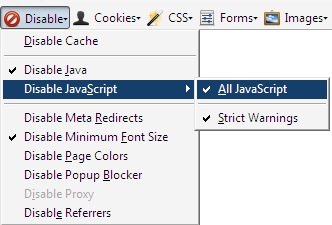
2. After installing the  pug-in simply restart the Firefox and you will get a new toolbar named "Web Developer Toolbar" now  click on  Disable button.


3. Select Disable Javascript.
4. Again select “All Javascript” option.


Note :- After doing your work don't forget to unchecked the disable java and disable JavaScript because most of sites requires JavaScript enabled in order to perform some specific task.
 
Enjoy......:-)
Posted by Fari at 4:33 PM No comments:
Email ThisBlogThis!Share to XShare to FacebookShare to Pinterest
Labels: Tips and Tricks, tutorial

Saturday, July 28, 2012

Make Free Calls => No Voip No Pin No additional Numbers to dial (Need Android/Iphone)

Make Free Calls


Free Call Friends...you heard it right.

Earlier there was this ibibo for making free calls but I hate it.
Make free calls all over India via Android/Iphone.
Just Download application from Android market, install it and make free calls all over country. It works in 40 Countries including India.


CROWDCALL
The name of the application is CrowdCall.

Download this application from the given below link

http://market.android.com/search?q=pname:com.socialdial.crowdcall.app

1) after installing open the app and enter Ur own phone number from which u installed app and running that app
2) after that open it and enter Ur friend's number or any other u r going to call
3)during that process u r going to receive to call from a number...receive that call and press1
4) after that don't disconnect the call as the other person is receiving your call at this time. So call for free.

NOTE: The other person have to attend the call and press 1in keypad in-order to talk.
Posted by Fari at 10:06 PM No comments:
Email ThisBlogThis!Share to XShare to FacebookShare to Pinterest
Labels: Free call, Free Stuff, tutorial

Monday, August 8, 2011

Remove Shortcut Virus in Flash Drive


          One of the irritating virus is shortcut virus, which creates a shortcut file to all the folders in the flash drive.

Let us see how to remove the shortcut virus:

First if you did not format your flash drive, then check whether the files are not in 

hidden mode. Follow the following steps. 

Step 1: 

Click on the below link and download the file "AutorunExterminator" 

http://en.kioskea.net/download/download-11613-autorun-exterminator 

Extract it --> Double-click on "AutorunExterminator" --> Plug your flash drive now. 

This will remove the autorun.inf files from your flash drive and also from drives. 

Step 2: 

Click on "Start" -->Run --> type cmd and click on OK. 

Here I assume your flash drive letter as G: 

Enter this command. 

attrib -h -r -s /s /d g:\*.* 

You can copy the above command --> Right-click in the Command Prompt and 

paste it. 

Note: Don't forget to replace the letter g with your flash drive letter. 

Now press "Enter". 

Now check for your files in Flash Drive. 

Step 3: 

After that, download the Malwarebytes' Anti-Malware from the below link 

http://en.kioskea.net/download/download-105-malwarebytes-anti-malware
 
 
Update it --> Perform "Full Scan" 

Note : Default selected option is "Quick Scan". 

Now you are free from shortcut virus……


Posted by Fari at 2:02 AM No comments:
Email ThisBlogThis!Share to XShare to FacebookShare to Pinterest
Labels: shortcut virus, tutorial
Older Posts Home
Subscribe to: Posts (Atom)

Blog Archive

  • ▼  2020 (2)
    • ▼  March (2)
      • Best Hosting Service for Startups and Small Busine...
      • Spending Money to Learn Digital Marketing Is Becom...
  • ►  2017 (1)
    • ►  March (1)
  • ►  2013 (4)
    • ►  June (3)
    • ►  March (1)
  • ►  2012 (28)
    • ►  December (5)
    • ►  August (12)
    • ►  July (11)
  • ►  2011 (8)
    • ►  November (1)
    • ►  September (2)
    • ►  August (1)
    • ►  April (1)
    • ►  March (1)
    • ►  January (2)

Categories

  • 1 year Genuine Licence Key (2)
  • access facebook (1)
  • Android (3)
  • Application (7)
  • Box.net (1)
  • Cloud Storage (1)
  • Flash Player (1)
  • Free Antivirus key (2)
  • Free Avast (1)
  • Free call (1)
  • Free SMS (1)
  • Free Stuff (5)
  • Giveaway (1)
  • idevice (1)
  • iTunes (1)
  • iTunes Alternative (1)
  • Offer (1)
  • Offline Installer (3)
  • promotion (4)
  • shortcut virus (1)
  • Skype (1)
  • SynciOS (1)
  • Tips and Tricks (16)
  • tutorial (5)
Watermark theme. Powered by Blogger.